
Intensity minutes are the time you spend exercising hard enough to actually move the needle on heart health — not just moving, but moving with your heart rate above a moderate threshold. This page covers what they are, how Garmin calculates them, the moderate-vs-vigorous distinction, the 150-minute weekly target, age-based recommendations, and the real intensity minutes I have logged on a Garmin watch every week from February 2026 at age 62.
What Are Intensity Minutes?
Intensity minutes measure how much time you spend exercising at a heart rate that produces real cardiovascular benefit — effort hard enough to drive heart and lung adaptation, not just movement. Most fitness trackers report this metric under slightly different names: Garmin calls them Intensity Minutes, Apple Watch calls them Exercise Minutes, and Fitbit calls them Active Zone Minutes. The underlying idea is the same: only the time your heart rate is elevated above a moderate threshold counts toward your weekly health total.
The metric was created so tracker users would have a number to aim for that mirrors the official physical-activity guidelines from the World Health Organization and the U.S. Centers for Disease Control. Those guidelines call for 150 minutes of moderate-intensity activity or 75 minutes of vigorous-intensity activity per week — and intensity minutes are essentially a real-time scoreboard for how close you are to that target.
I’m 62 Years Old. I Track Every Intensity Minute from February 2026.
This page is my real, unedited weekly log. No filters, no cherry-picking. Some weeks I crush 500 minutes. Some weeks I barely clear 200. But I show up every week, and I track it all. If you are in your 50s, 60s, or 70s and wondering whether you can do this: you can. Follow along and see for yourself.
Bookmark this page – I update it after every exercise that you can see my progress.
My Last 8 Weeks of Intensity Minutes
62 years old. Running, hiking, skiing, cycling, pickleball. Every recent week above the WHO target.
Week 20: June 22 – June 28
| Day of the week | Exercise | Moderate minutes | Vigorous Minutes x 2 | Total for the day |
|---|---|---|---|---|
| Monday | 0 min | |||
| Tuesday | 0 min | |||
| Wednesday | 3 sets x 12 Shoulder Press and 4 pull ups. Plus 6 miles Treadmill run. | 16 min | 66 min x 2 = 132 min | 148 min |
| Thursday | ||||
| Friday | ||||
| Saturday | ||||
| Sunday | ||||
| Total for the week | 148 min |
Week 19: June 15 – June 21
| Day of the week | Exercise | Moderate minutes | Vigorous Minutes x 2 | Total for the day |
|---|---|---|---|---|
| Monday | 0 min | |||
| Tuesday | 0 min | |||
| Wednesday | 0 min | |||
| Thursday | 3 sets x 12 Shoulder Press and treadmill run 6 miles. | 25 min | 66 min x 2 = 132 min | 157 min |
| Friday | 0 min | |||
| Saturday | 0 min | |||
| Sunday | 3 sets x 12 Shoulder Press, treadmill run 4 miles, 4 pull ups. | 10 min | 44 min x 2 = 88 min | 98 min |
| Total for the week | 255 min |
How Garmin Calculates Intensity Minutes
Garmin’s algorithm is the closest of any major tracker to the WHO definition. Three things determine whether a given minute counts:
- Your resting heart rate — Garmin learns this automatically from your sleep data
- Your maximum heart rate — Garmin estimates this as 220 minus your age unless you set a custom value
- Your current heart rate during the activity
From these three, Garmin calculates your heart rate reserve (HRR): max HR minus resting HR. That is the range your heart can work in. Garmin then sets two thresholds:
- Moderate threshold: resting HR + 50% of HRR
- Vigorous threshold: resting HR + 70% of HRR
Any minute spent above the moderate threshold earns 1 intensity minute. Any minute spent above the vigorous threshold earns 2 intensity minutes — the double credit. Activity below the moderate threshold earns nothing. Most newer Garmin watches credit short bouts immediately, but older models required at least 10 consecutive minutes of elevated heart rate before they would start counting.
A worked example from my own watch: I am 62, so my estimated max HR is 158 bpm (220 − 62). My resting HR is roughly 52, so my HRR is 106. That puts my moderate threshold at 105 bpm (52 + 53) and my vigorous threshold at 126 bpm (52 + 74). A steady treadmill jog that holds my heart at 130–140 bpm sits well into the vigorous range and earns 2 intensity minutes per minute. A brisk walk at 110 bpm earns 1 per minute. A casual stroll at 95 bpm earns nothing. For more on how reliable this calculation actually is, see how accurate Garmin intensity minutes are.
Moderate vs Vigorous Intensity
The single biggest source of confusion around intensity minutes is the moderate-vs-vigorous split. Here is the practical breakdown:
| Category | What it feels like | Examples | Intensity minutes earned |
|---|---|---|---|
| Moderate | You can hold a conversation but not sing | Brisk walking, easy hiking, recreational cycling under 10 mph, leisurely swimming, light gardening | 1 per minute (1× credit) |
| Vigorous | You can only get out a few words between breaths | Running, fast cycling above 10 mph, hill repeats, lap swimming, basketball, singles tennis | 2 per minute (2× credit) |
| Light | Feels easy, no real exertion | Casual stroll, slow walking, stretching, light yoga | 0 per minute (does not count) |
The doubling rule for vigorous activity is not arbitrary — it reflects real physiology. Vigorous exercise drives roughly twice the cardiovascular adaptation per minute as moderate exercise. That is why the WHO formally treats 75 minutes of vigorous activity as equivalent to 150 minutes of moderate activity, and why Garmin’s 2× credit lines up with the underlying science.
The 150-Minute Weekly Target (the 150 Rule)
The 150-minute weekly target is the most-cited number in modern public-health guidance. It comes out of decades of epidemiological research involving hundreds of thousands of adults. The dose-response curve looks roughly like this:
- 0 minutes/week: highest all-cause mortality risk among adults
- 150 minutes/week: roughly 30% lower all-cause mortality
- 300 minutes/week: small additional benefit, curve flattens
- 500+ minutes/week: no further mortality benefit (and not harmful)
150 minutes is the “knee” of the curve — below it you miss most of the available cardiovascular protection, above it every extra 30 to 60 minutes per week brings smaller but real benefits up to about 300. In intensity-minute terms, 150 IM per week is the WHO baseline. You can hit it with 150 minutes of moderate work, 75 minutes of vigorous work, or any combination. A single 30-minute run typically banks around 60 intensity minutes — that is 40% of the weekly goal in one workout. For more on this target specifically, see what counts toward 150 intensity minutes.
Age-Based Intensity Minute Recommendations
The 150-minute weekly target applies to most adults from age 18 through 80+, with the following age-specific adjustments from the WHO and CDC:
| Age group | Weekly intensity minute target | Notes |
|---|---|---|
| Children 5–17 | 420+ (60 minutes daily, mostly aerobic) | Vigorous activity 3+ days per week; muscle and bone strengthening 3+ days per week |
| Adults 18–64 | 150–300 moderate, or 75–150 vigorous | Plus muscle-strengthening activity 2+ days per week |
| Adults 65+ | 150 minimum (same baseline as younger adults) | Add balance training 3+ days per week; if 150 is not reachable, “be as physically active as your abilities and conditions allow” |
| Pregnant or postpartum | 150 minutes moderate per week | Avoid contact sports and high-fall-risk activities; consult your provider |
| Adults with chronic conditions | 150 if possible; otherwise some activity | “Some activity is better than none” — exact target depends on the condition |
For adults over 65 specifically, intensity minutes are an especially useful metric. The popular “10,000 steps per day” advice can be misleading at older ages — slower walking pace often does not push the heart rate over the moderate threshold, so a senior can hit 10,000 steps with zero intensity minutes. Tracking intensity minutes refocuses your attention on effort that actually protects the heart, which is what the WHO guidelines are really measuring.
More Weekly Intensity Minute Logs (Week 18 and Earlier)
The earlier weeks of my Garmin intensity minute log, going back to Week 1 in February 2026. Same format — every workout, every week, no cherry-picking.
Week 18: June 8 – June 14
| Day of the week | Exercise | Moderate minutes | Vigorous Minutes x 2 | Total for the day |
|---|---|---|---|---|
| Monday | Hiking for 1.73 miles, Running on treadmill for 5 miles, 3 sets x 12 Shoulder Press, 4 pull ups. | 28 min | 50 min x 2 = 100 min | 128 min |
| Tuesday | 0 min | |||
| Wednesday | 3 sets x 12 Shoulder Press and Treadmill run 4 miles. | 25 min | 44 min x 2 = 86 min | 113 |
| Thursday | 0 min | |||
| Friday | 3 sets x 12 Shoulder Press and 4 pull ups. Plus Treadmill run 6 miles (first time since May). | 26 min | 64 min x 2 = 128 | 154 min |
| Saturday | Fishing on the lake | 10 min | 2 min x 2 = 14 min | 14 min |
| Sunday | Swimming in the lake 550 yards, Bench Press 3 sets x 12 with 45 lbs and 50 lbs, 4 pull ups. | 20 min | 85 min x 2 = 170 min | 190 min |
| Total for the week | 599 min |
Week 17: June 1 – June 7
| Day of the week | Exercise | Moderate minutes | Vigorous Minutes x 2 | Total for the day |
|---|---|---|---|---|
| Monday | biking for 5.72 miles | 38 min | 38 min | |
| Tuesday | biking for 15.17 miles | 21 min | 2 min x 2 = 4 min | 25 min |
| Wednesday | biking for 1.86 miles | 5 min | 5 min | |
| Thursday | biking for 10 miles | 31 min | 2 min x 2 = 4 min | 35 min |
| Friday | 3 sets x 12 Shoulder Press and Treadmill run 4 miles. | 12 min | 43 min x 2 = 86 min | 98 min |
| Saturday | Kayaking for 2.84 miles, Open Water Swimming for 236 yards | 4 min | 12 min x 2 = 24 min | 28 min |
| Sunday | 0 min | |||
| Total for the week | 229 min |
Week 16: May 25 – May 31
| Day of the week | Exercise | Moderate minutes | Vigorous Minutes x 2 | Total for the day |
|---|---|---|---|---|
| Monday | 0 min | |||
| Tuesday | 3 sets x 12 Shoulder Press and 4 pull ups. Plus Treadmill run 5 miles. Bicycling for 4.71 miles | 56 min | 59 min x 2 = 118 min | 174 min |
| Wednesday | Hiking for 1.1 miles and kayaking for 2.5 miles | 33 min | 6 min x 2 = 12 min | 45 min |
| Thursday | 0 min | |||
| Friday | 3 sets x 12 Shoulder Press and Treadmill run 4 miles. And hiking for 2.48 miles. | 35 min | 43 min x 2 = 86 min | 121 min |
| Saturday | 0 min | |||
| Sunday | 3 sets x 12 Shoulder Press and treadmill run 5 miles. | 15 min | 54 min | 123 min |
| Total for the week | 463 min |
Week 15: May 18 – May 24
| Day of the week | Exercise | Moderate minutes | Vigorous Minutes x 2 | Total for the day |
|---|---|---|---|---|
| Monday | Kayaking 3.15 miles | 38 min | 5 min x 2 = 10 min | 48 min |
| Tuesday | 0 min | |||
| Wednesday | 3 sets x 12 Shoulder Press and 3 pull ups. Plus Treadmill run 4 miles. | 16 min | 44 min x 2 = 88 min | 104 min |
| Thursday | 0 min | |||
| Friday | Fishing for a couple of hours | 7 min | 7 min | |
| Saturday | 3 sets x 12 Shoulder Press and 4 pull ups. Plus Treadmill run 4 miles. | 28 min | 44 min x 2 = 88 min | 116 min |
| Sunday | 0 min | |||
| Total for the week | 275 min |
Week 14: May 11 – May 17
| Day of the week | Exercise | Moderate minutes | Vigorous Minutes x 2 | Total for the day |
|---|---|---|---|---|
| Monday | 0 min | |||
| Tuesday | Hike 0.16 miles | 3 min | 3 min | |
| Wednesday | 3 sets x 12 Shoulder Press and 3 pull ups. Plus Treadmill run 6 miles. | 16 min | 64 min x 2 = 128 | 144 min |
| Thursday | 0 min | |||
| Friday | 0 min | |||
| Saturday | Kayaking 2.42 miles | 23 min | 23 min | |
| Sunday | 5 miles treadmill run | 29 min | 54 min x 2 = 108 min | 137 min |
| Total for the week | 307 min |
Week 13: May 4 – May 10
| Day of the week | Exercise | Moderate minutes | Vigorous Minutes x 2 | Total for the day |
|---|---|---|---|---|
| Monday | Hike 1.89 miles | 3 min | 3 min | |
| Tuesday | Treadmill run 5 miles | 17 min | 55 min x 2 = 110 min | 127 min |
| Wednesday | 0 min | |||
| Thursday | Hike 1.55 miles and treadmill run 5 miles | 46 min | 58 min x 2 = 116 min | 162 min |
| Friday | 0 min | |||
| Saturday | 3 sets x 12 Shoulder Press and 3 pull ups. Plus Treadmill run 4 miles and 2.85 miles hike | 60 min | 48 min x 2 = 96 min | 156 min |
| Sunday | 1.93 miles hike | 20 min | 20 min | |
| Total for the week | 468 min |
Week 12: Apr 27 – May 3
| Day of the week | Exercise | Moderate minutes | Vigorous Minutes x 2 | Total for the day |
|---|---|---|---|---|
| Monday | 4 mile run on the treadmill | 15 min | 43 min x 2 = 86 min | 101 min |
| Tuesday | Swimming in the ocean 960 yards | 36 min | 25 min x 2 = 50 min | 86 min |
| Wednesday | Swimming in the ocean 830 yards and hiking 1.5 miles | 33 min | 28 min x 2 = 56 min | 89 min |
| Thursday | Swimming in the ocean 700 yards | 14 min | 23 min x 2 = 46 min | 60 min |
| Friday | Swimming in the ocean 815 yards | 9 min | 28 min x 2 = 56 min | 65 min |
| Saturday | Swimming in the ocean 193 yards | 12 min | 4 min x 2 = 8 min | 20 min |
| Sunday | Swimming in the ocean 588 yards | 20 min | 25 min x 2 = 50 min | 70 min |
| Total for the week | 491 min |
Week 11: Apr 20 – Apr 26
| Day of the week | Exercise | Moderate minutes | Vigorous Minutes x 2 | Total for the day |
|---|---|---|---|---|
| Monday | 0 min | |||
| Tuesday | 0 min | |||
| Wednesday | 7 miles run on the treadmill | 32 min | 74 min x 2 = 148 min | 180 min |
| Thursday | hike 2.78 miles | 14 min | 14 min | |
| Friday | 0 min | |||
| Saturday | pickleball play for 1 hour 30 minutes | 42 min | 14 min x 2 = 28 min | 70 min |
| Sunday | 0 min | |||
| Total for the week | 264 min |
Week 10: Apr 13 – Apr 19
| Day of the week | Exercise | Moderate minutes | Vigorous Minutes x 2 | Total for the day |
|---|---|---|---|---|
| Monday | 4 miles run on the treadmill | 9 min | 43 min x 2 = 86 min | 95 min |
| Tuesday | 9.89 miles bicycling | 36 min | 19 min x 2 = 38 min | 74 min |
| Wednesday | Played Pickleball for an hour 10 minutes | 51 min | 10 min x 2 = 20 min | 71 min |
| Thursday | lifting plus 1.5 treadmill run | 14 min | 18 min x 2 = 36 min | 50 min |
| Friday | 0 min | |||
| Saturday | 7 miles run on the treadmill | 24 min | 76 min x 2 = 152 | 176 min |
| Sunday | 0 min | |||
| Total for the week | 466 min |
Week 9:
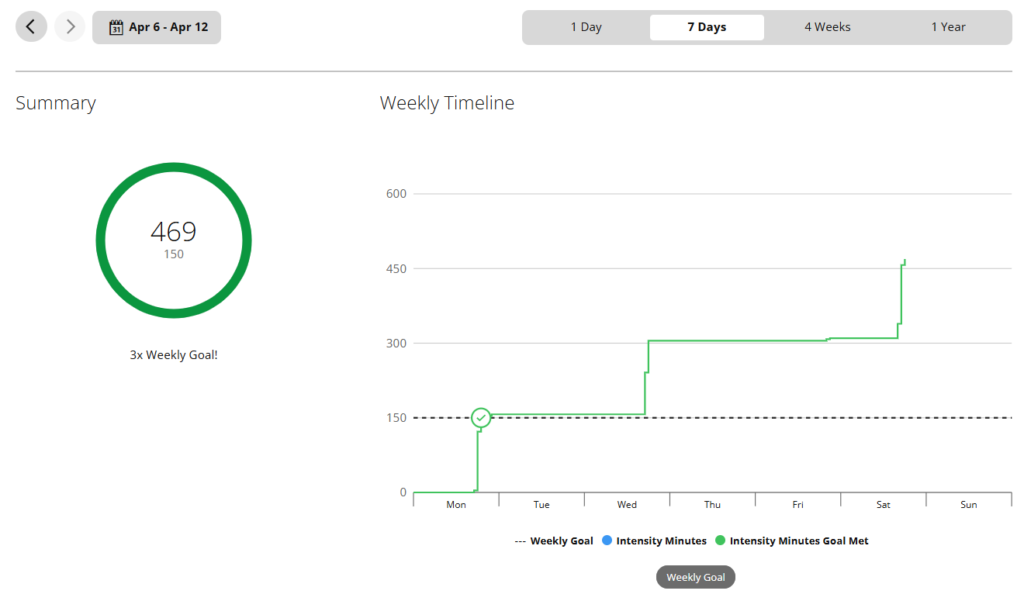
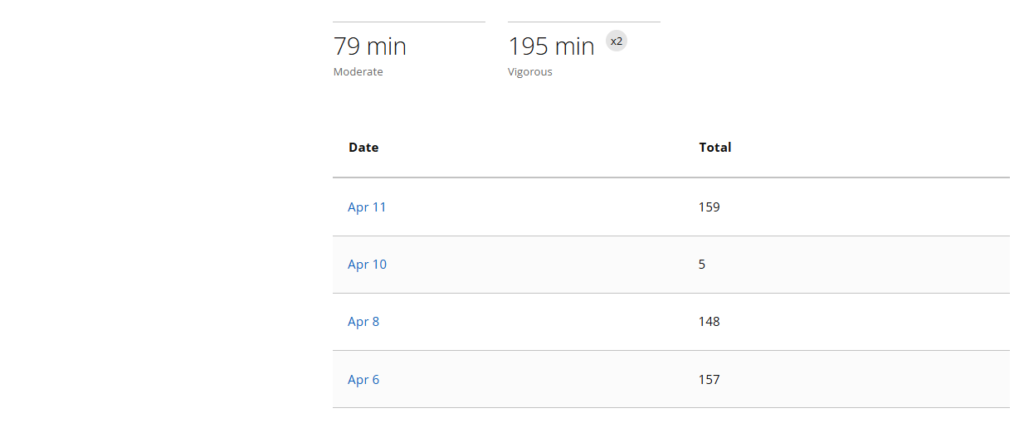
- Monday, Apr 6 – ran 6 miles on the treadmill – 154 Intensity Minutes. (Remember it has to be 150 minutes for the week).
- Wednesday, Apr 8 – ran 6 miles on the treadmill – 148 Intensity Minutes. Already doubled the weekly target!
- On Friday, Apr 10 I did not run. I went fishing and earned 5 Intensity minutes.
- Saturday, Apr 11 – ran on treadmill 6.5 miles – 159 minutes.
Week 8:
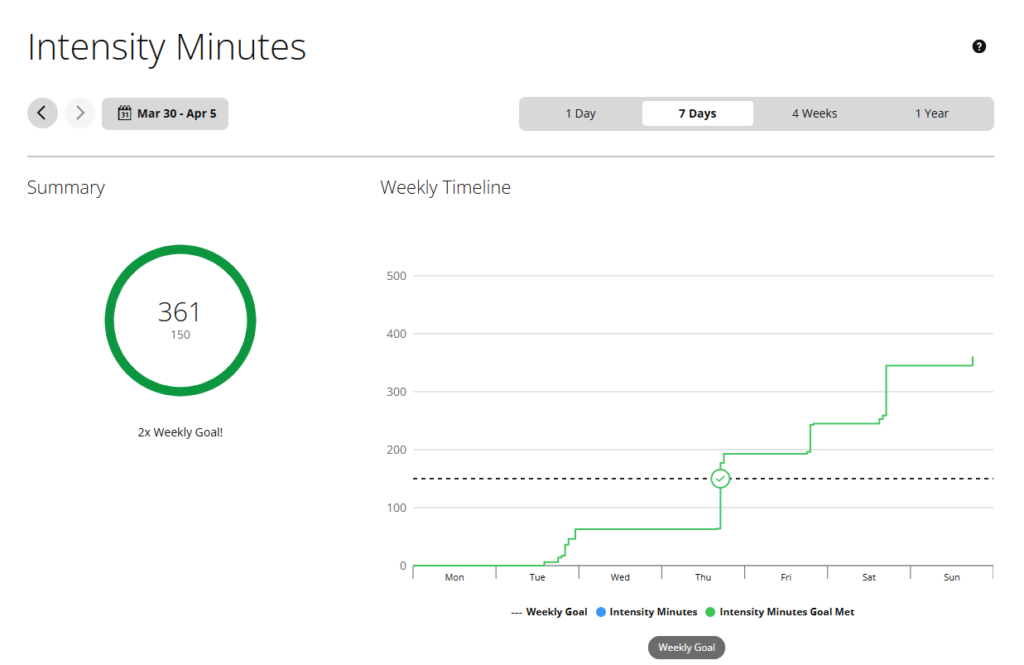
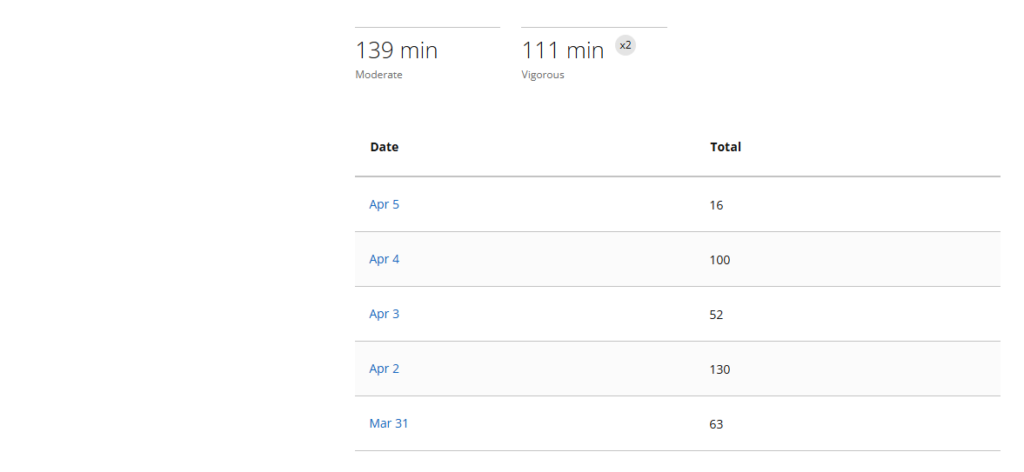
- On Mar 31 I walked a lot – 63 Intensity Minutes.
- Apr 2, 5 miles treadmill run – 130 Intensity Minutes.
- On Apr 3 added 52 Intensity Minutes for a little hike.
- My week ends tomorrow. And today I added 100 intensity minutes with a hike for 1.46 miles and a treadmill run for 4 miles.
- Apr 5, last day of Week 8. 2 miles walk added 16 intensity minutes.
Week 7:
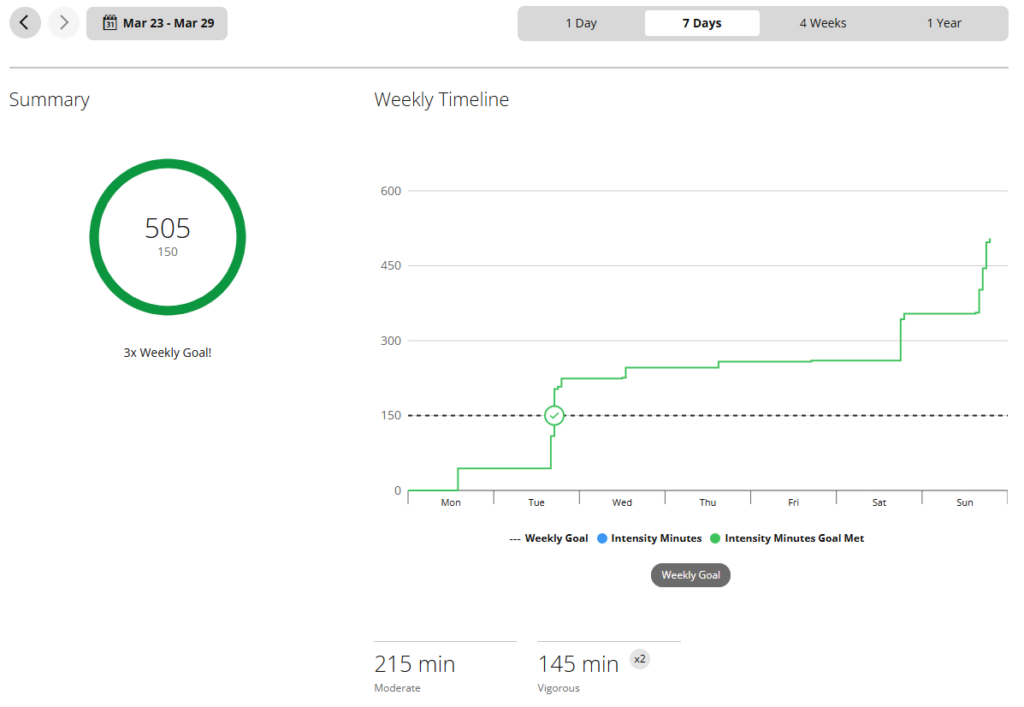
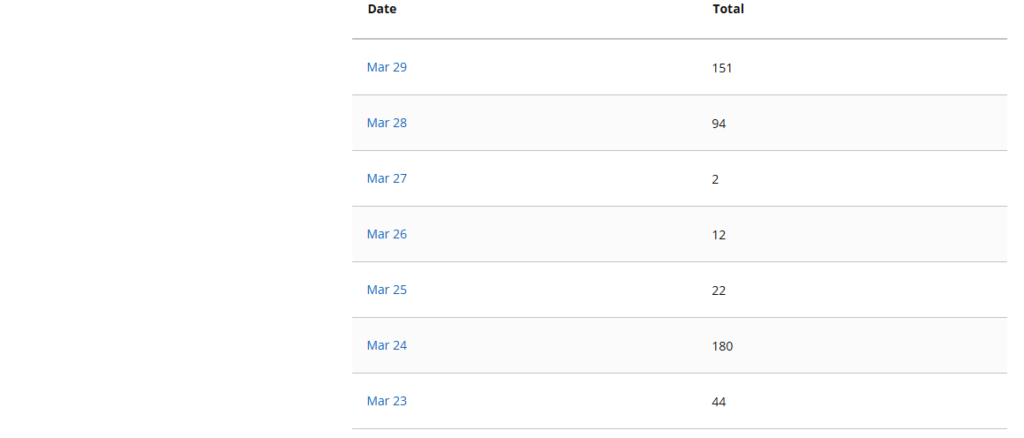
- First intensity minutes of the week from playing Ping Pong – 44 minutes
- Added another 159 Intensity Minutes today Mar 24 for running 7 miles on the treadmill.
- Today, Mar 25 another 22 Intensity Minutes from 1.65 miles hike.
- Mar 26, just added another 12 Intensity Minutes for 4 miles bicycle ride.
- Mar 28, end of week. Earned 94 Minutes by running 4 miles on the treadmill.
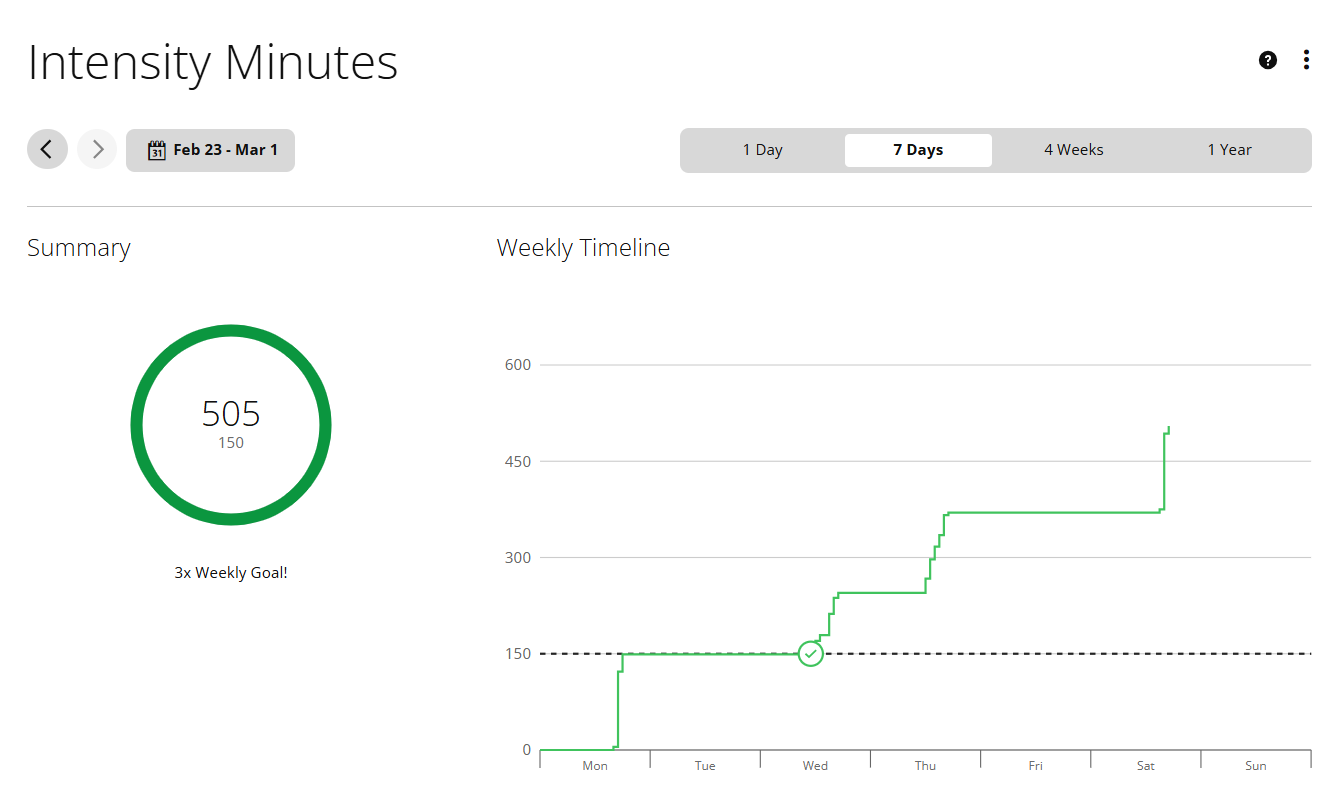
- Wow! Such a great week! Today, Mar 29 I was able to add another 151 Intensity Minutes by 4.21 miles hike to the total of 505 for this week.
Week 6:
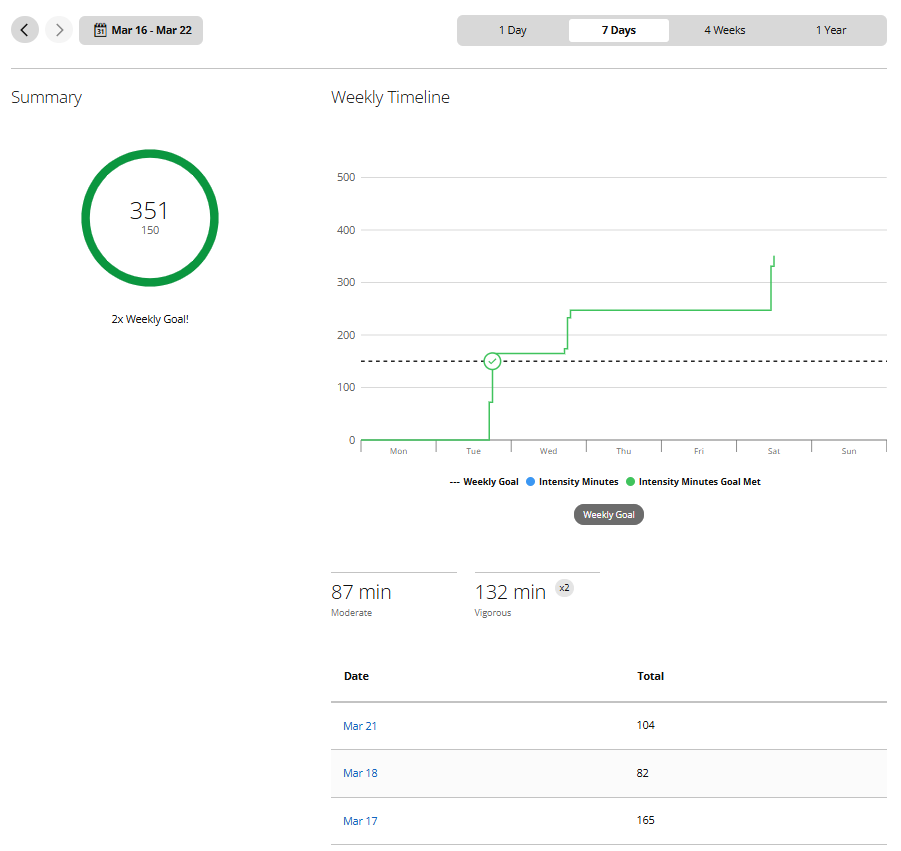
- On Mar 17 did weights and 7 miles treadmill run. Total = 165 Intensity Minutes.
- Mar 18 added another 82 Intensity minutes from 2 miles hike.
- For Mar 21 added 104 Intensity Minutes from 5 miles run on the treadmill
Week 5:
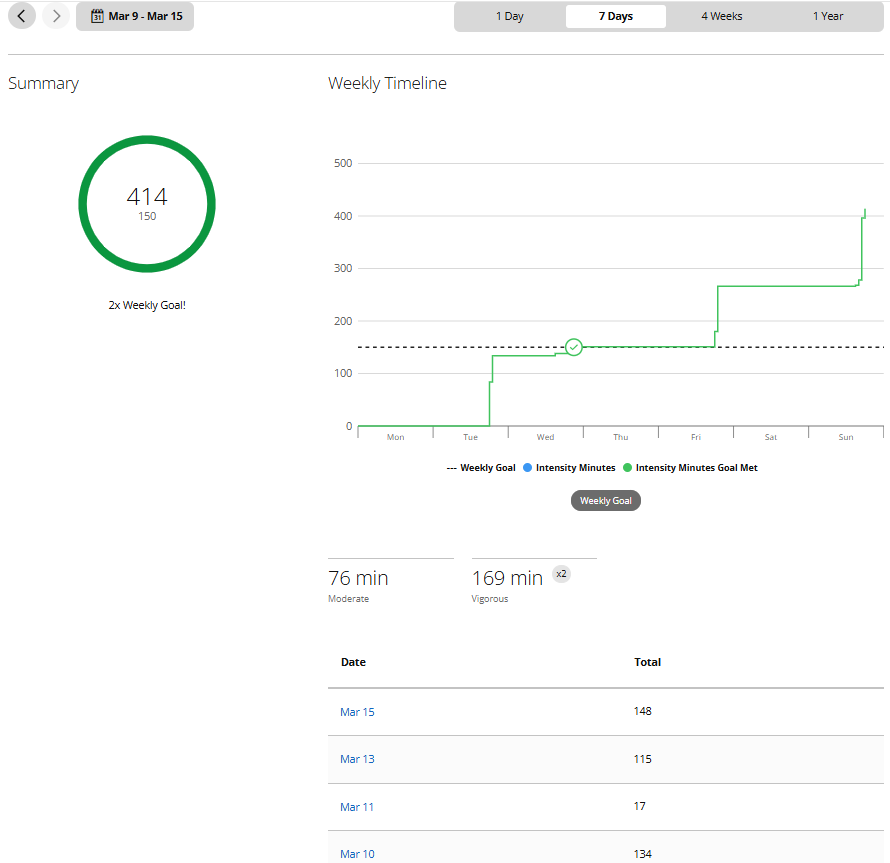
- Good start. On Mar 10 I ran 6 miles on the treadmill.
- Mar 11 I walked a lot and earned another 17 Intensity minutes.
- On Mar 13 I ran 5 miles on the treadmill, another 115 Intensity minutes.
- Today, Mar 15 hiked for 2.65 mi and ran on the treadmill 6 miles which gave me 148 intensity minutes.
Week 4:
- Wow, such a quick week!
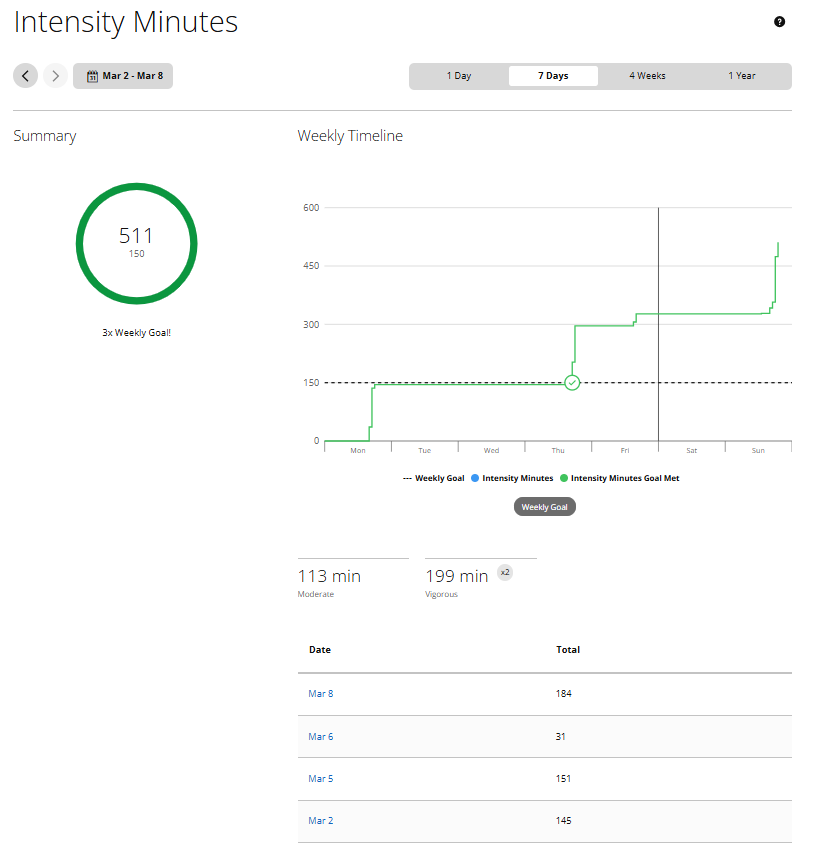
- On Mar 2 I ran 6 miles – 145 Intensity minutes.
- Mar 5, My first 7 miles run – 151 Intensity minutes.
- Mar 6, yesterday I walked/hiked 3 miles – only 31 Intensity minutes
- Mar 8, today Hiked 3 miles – 16 int. min, did weights – 2 int. min and ran 7 miles on the treadmill – 141 Total 181 int. minutes.
Week 3:
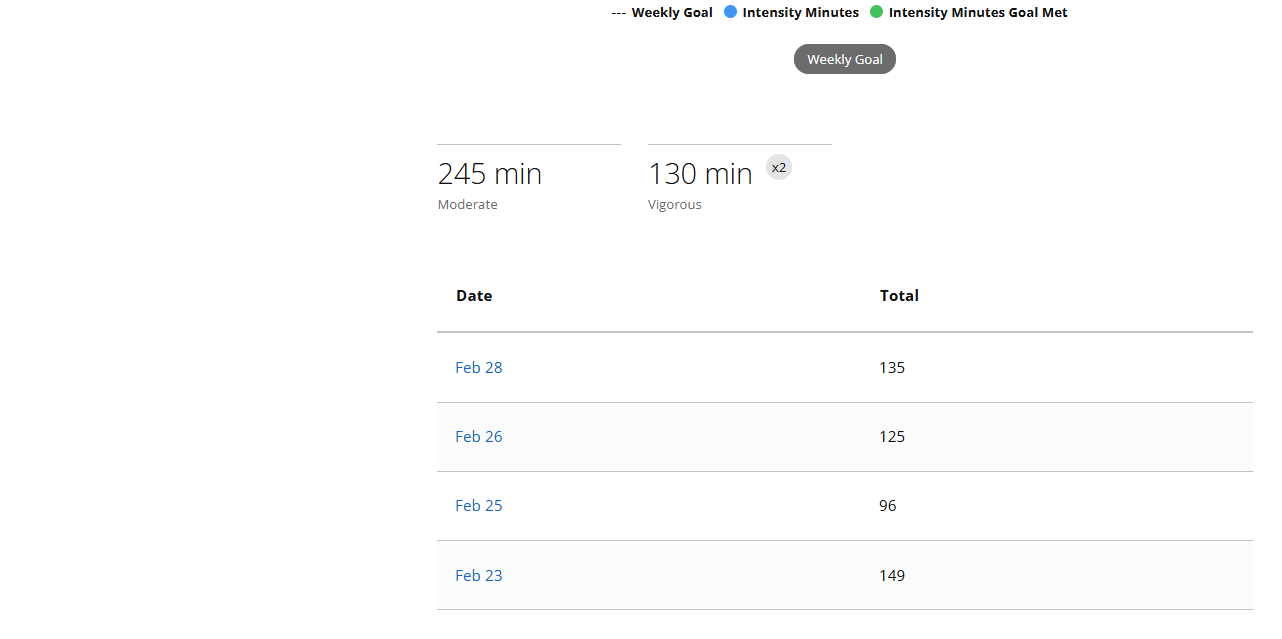
- OK, this week was amazing! I ran 6 miles on Feb 23 and on Feb 28.
- Downhill skied on Feb 24 and Feb 25.
Week 2:
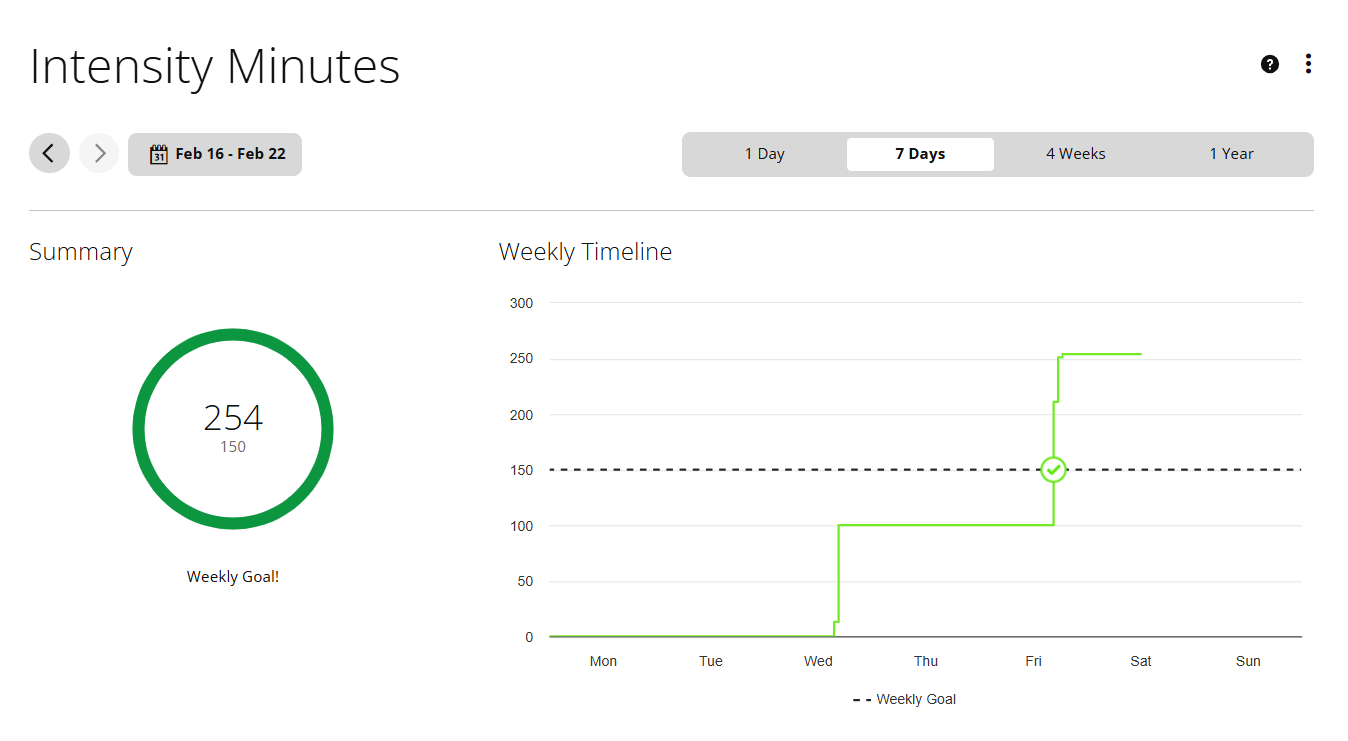
- This week I was recovering from the last ski trip. On Feb 18 I was able to run only 4.5 miles because of my quads stiffness. But on Feb 20 it looked much better, 6 miles for 59 min 18 sec.

Week 1:
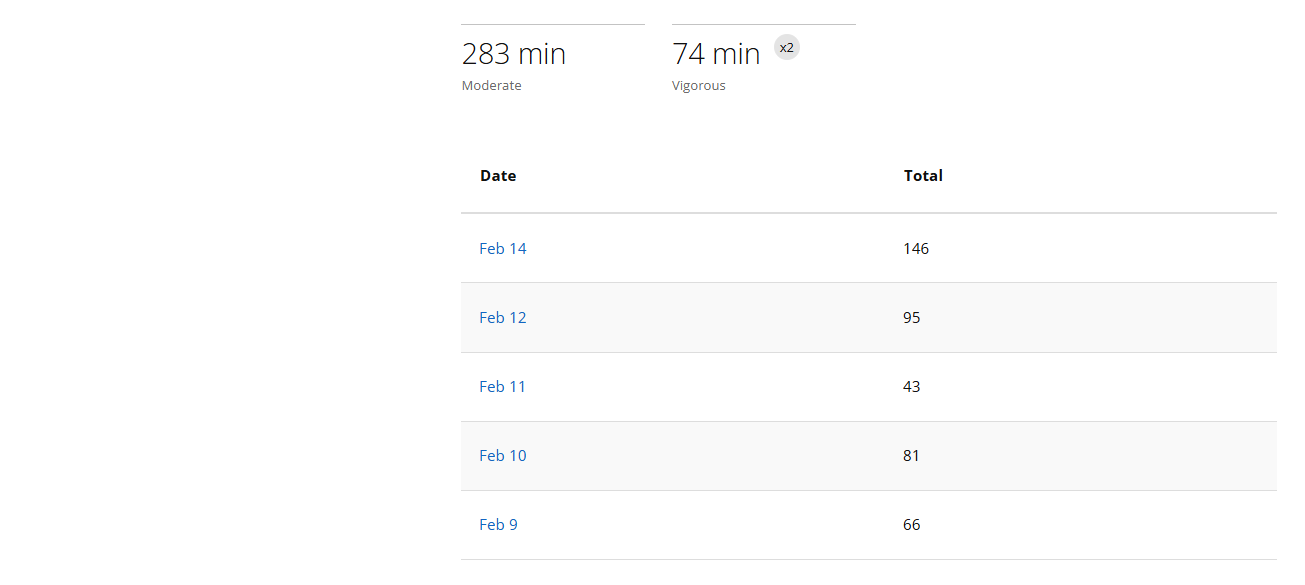
- This is the week we downhill skied. So I went skiing for 3 days (Feb 9, 10 and 12) and one day (Feb 11) we had a short hike.
- The issue I had is not enough sleep. Because we drank after skiing a lot. For two days I had to nap in the afternoon.

Frequently Asked Questions About Intensity Minutes
What do intensity minutes mean on a fitness tracker?
Intensity minutes measure the time you spend exercising at a heart rate that is at least at the moderate threshold (typically 50% of heart rate reserve above resting). On Garmin, every minute above the moderate threshold earns 1 intensity minute, and every minute above the vigorous threshold earns 2. The weekly goal of 150 intensity minutes comes from World Health Organization guidelines linking that amount of activity to a roughly 30% reduction in all-cause mortality.
How does Garmin calculate intensity minutes?
Garmin uses your resting heart rate, your maximum heart rate (estimated as 220 minus age unless you set a custom value), and your current heart rate during exercise. It calculates your heart rate reserve (max minus resting), then sets a moderate threshold at resting HR + 50% of reserve and a vigorous threshold at resting HR + 70% of reserve. Time above the moderate threshold earns 1 intensity minute per minute; time above the vigorous threshold earns 2.
Why do vigorous intensity minutes count double?
Vigorous exercise drives roughly twice the cardiovascular adaptation per minute as moderate exercise. The 2× credit reflects this physiological reality, which is why the WHO considers 75 minutes of vigorous activity equivalent to 150 minutes of moderate activity for purposes of the weekly target.
How many intensity minutes per week is the goal?
The standard goal is 150 intensity minutes per week of moderate activity, or 75 minutes of vigorous activity (which counts as 150 IM under the doubling rule), or any combination. This is the WHO and CDC recommendation for adults 18 and older. Going up to 300 minutes per week provides additional benefits at a diminishing rate.
Can walking earn intensity minutes?
Yes — but only if your pace pushes your heart rate above the moderate threshold. Brisk walking at 3.5–4.5 mph typically qualifies. Casual strolling below 3 mph usually does not, because your heart rate stays below the threshold. Walking uphill or on an incline makes it much easier to earn intensity minutes at any speed.
Are intensity minutes the same on Garmin, Apple Watch, and Fitbit?
No, the implementations differ. Garmin uses Intensity Minutes with 2× credit for vigorous activity. Apple Watch uses Exercise Minutes and does not double-count vigorous activity, so Apple totals are usually lower than Garmin for the same workout. Fitbit uses Active Zone Minutes with a system similar to Garmin (1× moderate, 2× vigorous).
Do age-based intensity minute targets change after 65?
The baseline target stays at 150 minutes per week for adults 65 and older. The WHO adds two recommendations specific to older adults: include balance training at least 3 days per week, and if you cannot reach 150 minutes, do as much as your abilities and conditions allow. Some activity is always better than none.